The AI restaurant POS that reads your kitchen's numbers while you run the floor
Eatin POS takes the order, fires the kitchen ticket, moves the stock and posts the khata entry. Then it reads what just happened and tells you what to prep tomorrow, which dish is quietly losing money, and what to buy before you run out.
No trial period · No per-terminal licence · No locked features
First time setting up? Walk through the setup guide.
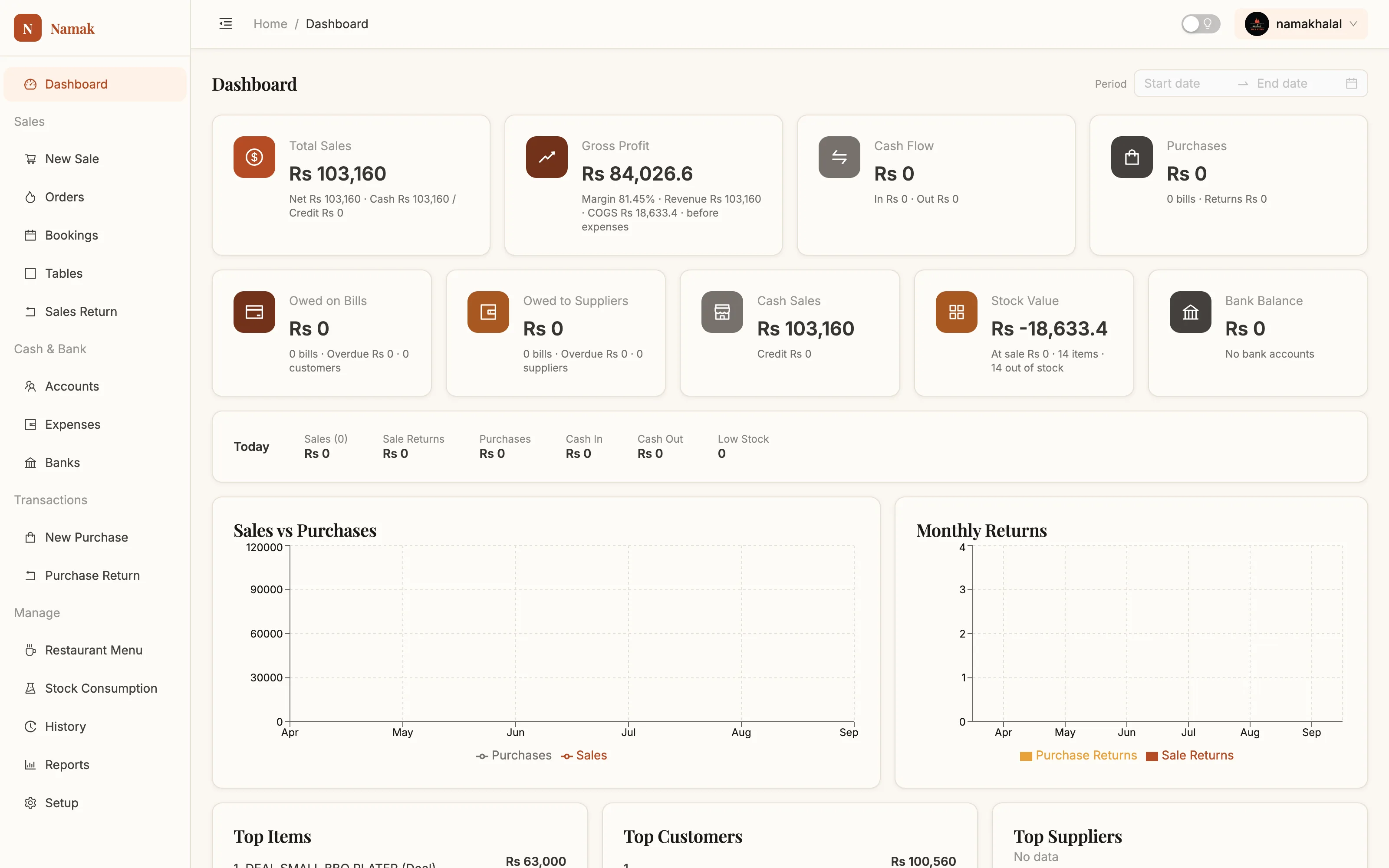
Most POS software records the past. This one reads it.
Your till already knows every dish sold, every rupee of cost, every supplier bill and every guest who owes you. Eatin POS puts that history to work instead of filing it — so the answers show up before you go looking for them.
It forecasts the rush
Sales history, day of week, weather and season point at tomorrow's covers. You get a prep list with quantities instead of a guess and a fridge full of waste.
It ranks your menu honestly
Every dish is scored on what it sells and what it truly costs after the recipe and wastage. Stars, workhorses and quiet losers, sorted for you.
It watches the store room
Consumption rate against what's on the shelf gives a real days-of-cover number, and a reorder list sized to the coming week — not to last month.
A real khata, not a note field
Every customer and supplier has a running ledger, and the AI flags the balances that have been sitting too long before they turn into bad debt.
Recipes that move stock
A plate of kababs is 250g of mince and two rotis. Sell the plate and the mince comes down, the food cost is known, and the margin lands on a report.
The kitchen gets its ticket
Orders fire to the right station by kitchen section. Add a dish later and only the new lines print, so nothing gets cooked twice.
Ask it the way you'd ask your manager
No report builder, no filters, no pivot tables. Type the question in plain English or Roman Urdu and get the number with the working shown.
- ✓“Which dish lost me money last month?”
- ✓“Pichlay hafte sab se ziada kya bika?”
- ✓“Who owes me more than 20,000 and hasn't paid in 30 days?”
- ✓“How much mince do I need for Saturday?”
- →Chicken Karahi — prep for 46 plates (18kg chicken)
- →Seekh Kabab — prep for 60 plates (15kg mince)
- →Biryani — steady, no change from last week
Find the dish that isn't earning
Profit by item ranks everything you sell by revenue, cost and margin — and the AI reads the ranking for you. Most kitchens find one popular dish making almost nothing and one quiet dish worth pushing.
- ✓Margin drift caught early — “chicken is up 14%, this dish needs a price move”
- ✓Price suggestions that respect what your guests already pay
- ✓Deals and add-ons scored on what they really add to the bill
- ✓Dead items flagged so the menu card stops carrying them

Smart underneath, simple on a busy Friday night
The intelligence stays out of the way at service. One full-screen register — scan a barcode, type a PLU, or tap through the menu grid, with the quantity chosen before the dish, the way staff actually work.
- ✓Dine in, take away and delivery, each with the right fields
- ✓Fractional quantities for anything sold by weight
- ✓Per-line rate override and per-line discount
- ✓Hold an order, or book it for 8pm and get warned when it's due
- ✓Required choices — spice level, size — enforced at the till

One entry, four jobs done
What happens when a waiter taps a dish and takes the money.
The order goes in
Tap through the menu, pick the table, set the guests. Press Create Order and the kitchen ticket prints at the right station.
The floor tracks it
The order board shows every open ticket grouped by status, refreshing itself every 20 seconds. Anything sitting 15 minutes turns red.
The bill is settled
Full, part payment or straight onto their khata. Cash or bank. The receipt prints and the guest's balance updates.
And the AI does the thinking afterwards
The recipe behind the dish pulls its ingredients out of stock. The sale lands in history, the profit lands on the dashboard, the credit lands on the customer's ledger — and every one of those entries feeds the forecast, the margin watch and the reorder list. Nobody typed any of it twice, and nobody had to build a report to see what it meant.
A full management system, not a starter tier
Every one of these is in the free version, because there is only one version.
AI assistant
Plain-language questions answered from your own sales, recipes and ledgers.
Demand forecasting
Tomorrow's covers and a prep list sized per dish, from your own history.
Menu engineering
Dishes scored on real margin, with price and menu-card suggestions.
Smart reordering
Days of cover per ingredient and a purchase list sized to the coming week.
Point of sale
Full-screen till, barcode and PLU search, fractional quantities, discounts.
Kitchen orders
Status board, ticket age, late warnings, per-station printing.
Tables & sections
Floor plan with seats, busy/free status and the running order per table.
Bookings
Orders held for later with a due-time alert that follows you around the app.
Recipes & costing
Components, wastage, automatic cost roll-up, deals built from dishes.
Add-ons
Required and optional choices, price changes, stock consumption per option.
Stock control
Opening counts, live stock, low-stock alerts, write-offs booked as expenses.
Customer khata
Credit sales, receipts applied to bills, printable statements.
Supplier ledger
Purchases, returns, payments and what you still owe each supplier.
Expenses & banks
Categorised expenses, multiple bank accounts, live balances.
Five reports
Customer sales, supplier purchases, profit by item, stock value, statements.
Team & roles
One login per person, roles that fit the job, an audit trail on every document.
Yes, the AI is free too
No trial that expires, no seat limits, no “contact us for pricing” on the intelligence. Eatin POS is free to use for as many terminals and as many staff as you like.
The things people ask first
What does the AI actually do?
It works on the data your own till produces. It forecasts how busy each day will be and turns that into a prep list, ranks your dishes by real margin after recipe cost and wastage, tracks how fast each ingredient is being consumed so it can tell you what to reorder, watches customer balances that are ageing, and answers questions typed in plain language. It does not invent numbers — every answer points back at the sales, recipes and ledgers behind it.
Does it need a lot of history before it's useful?
The reports and margin ranking work from your first week. The forecast gets noticeably better after about a month of trading, once it has seen each day of the week a few times — before that it will tell you it isn't confident rather than guess.
Is it really free, or free until I need something?
Really free. There is one version of Eatin POS and it has every feature described on this site — the AI, reports, recipes, multi-user, printing, the lot. No feature is held back for a paid tier.
Do I need special hardware?
No. It runs in a browser on any reasonably modern computer. A thermal roll printer and a barcode scanner make service faster but neither is required — you can print invoices to an ordinary A4 printer instead.
Can more than one person use it at once?
Yes. Give each person their own login and role. The till, the kitchen screen and the office laptop all see the same live data, and every document records who entered it.
What if I already have customers who owe me money?
Carry them in. The Opening Balance screen takes your existing khata — who owes you and who you owe — as at your start date, so the first statement you print is complete.
One POS, every kind of food business
The same program runs a two-table tea shop and a sixty-cover restaurant. Nothing is locked behind a plan, so the only thing that changes is which screens you use.
Restaurants & dhabas
Dine-in billing with a live floor plan, kitchen tickets by station, and a running khata for the regulars who settle weekly.
Cafés & tea shops
Fast counter service off the item picker, add-on groups for sizes and sugar, and a thermal receipt in one keystroke.
Takeaway & delivery
Token numbers, a delivery charge that lands on the bill by itself, and an orders board that shows what is late.
Bakeries & sweet shops
Sell by weight or by piece, cost every tray through a recipe, and take advance orders as bookings.
Cloud kitchens
No floor to manage — just tickets, food cost and margin. The profit-by-item report is the whole business on one screen.
Banquets & catering
Big orders booked ahead, part payments against them, and a supplier ledger that survives a busy wedding season.
Everything is documented
A written manual for every screen and every button — what it's for, what each control does, and the step-by-step for the jobs you do daily.